
Remote work from a van fails more often from dropped connections than from lack of gear. Before you spend money on a dedicated setup, understand what breaks down, because it is probably not what the “digital nomad” gear lists say it is.
Uptime Matters More Than Speed#
Most remote workers in vans do not fail because their internet is slow. They fail because their connection drops in the middle of a video call, disappears when they move between cell towers, or becomes unusable in locations where their single carrier has no coverage.
A 25 Mbps stable connection is better than a 100 Mbps connection that cuts out. For video calls (typically 1–3 Mbps per session), document collaboration, and code commits, speed is rarely the limiting factor. Uptime is.
This reframe changes what you buy. You are not optimizing for fast internet, you are optimizing for reliable internet in as many locations as possible.
Power Planning: Know Your Workday Budget#
Before choosing any gear, calculate your actual power draw for a working day.
Typical remote work draw:
| Device | Wattage | Hours/Day | Daily Wh |
|---|---|---|---|
| Laptop | 45–65W | 8 hrs | 360–520 Wh |
| Hotspot router | 5–15W | 10 hrs | 50–150 Wh |
| External monitor (optional) | 30–60W | 6 hrs | 180–360 Wh |
| Phone charging | 10W | 2 hrs | 20 Wh |
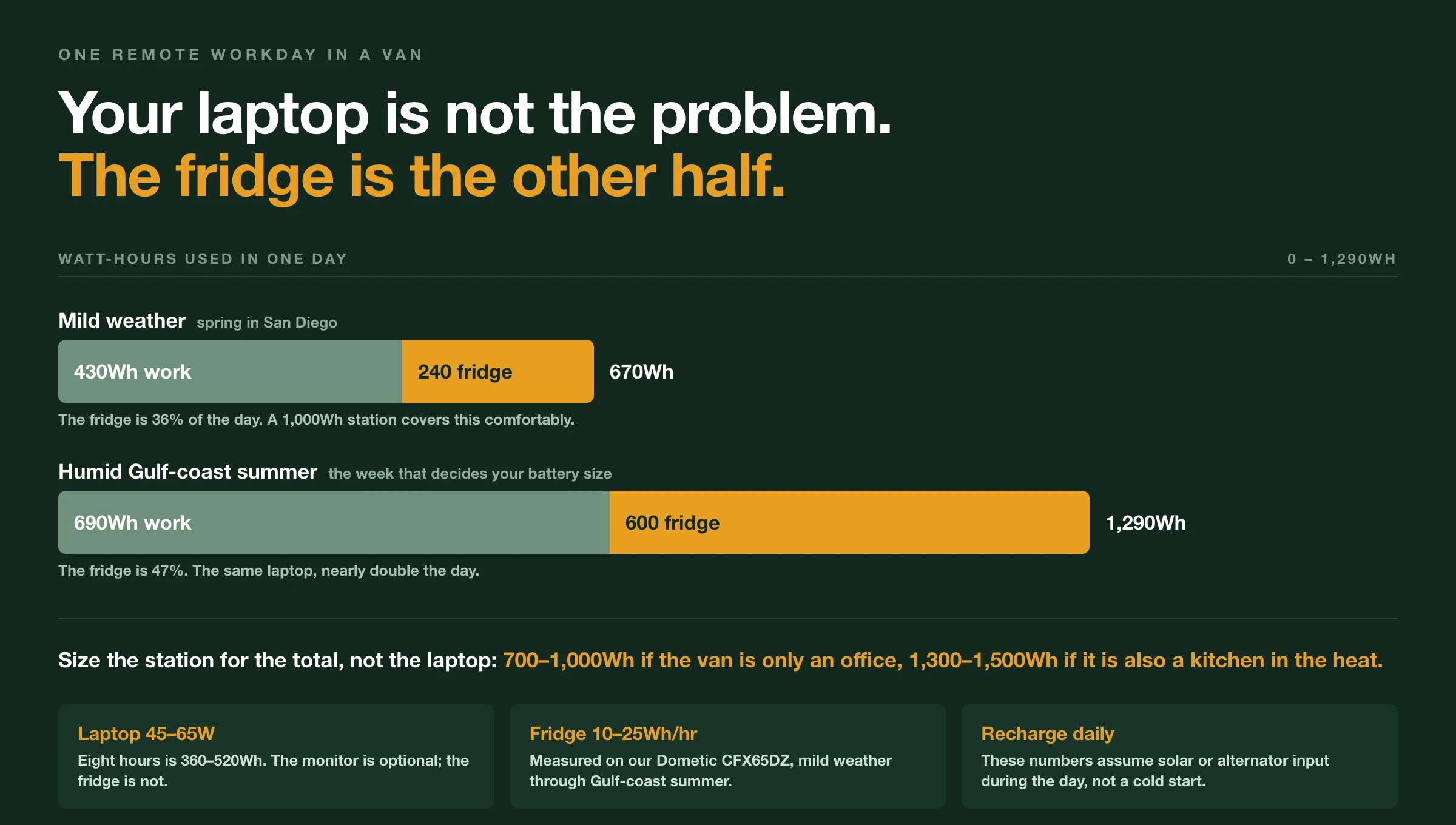
Without a monitor: 430–690 Wh per workday Estimate
With a monitor: 610–1,050 Wh per workday Estimate
That is your work load, and on its own it is manageable. A 700 Wh station carries a monitor-free workday with a reasonable buffer if you are also recharging from solar or your alternator during the day. Add a monitor and you want 1,000+ Wh.
Then there is the load nobody puts in the remote-work budget. If you run a compressor fridge, it very nearly doubles the day. Ours, a Dometic CFX65DZ, averages 10–12 Wh/hr in mild weather and 20–25 Wh/hr through a humid Gulf-coast summer Measured, which is 240–600 Wh a day before the laptop wakes up. A monitor-free workday plus that fridge lands at 670–1,290 Wh/day Estimate, and that total is what your station has to survive.
So the sizing splits in two. 700–1,000 Wh if the van is only an office. 1,300–1,500 Wh if it is also a kitchen in a hot climate, because a 1,000 Wh station only covers the mild end of that range.
The monitor, meanwhile, is close to a rounding error next to the fridge. Many people discover they do not need one: a laptop screen in a van, positioned correctly, is workable. Try your existing setup for a month before buying additional equipment.
For sizing guidance on battery capacity, see How Many Watt-Hours Do I Need?.
Carrier Diversity: The Rule That Prevents Most Work Failures#
This is the single most impactful thing you can do for remote work reliability.
Two SIMs, two carriers. If one carrier goes down, drops coverage in your current location, or has congested towers during peak hours, you switch to the other. Most remote work failures become minor inconveniences rather than missed meetings.
In the US, the relevant pairs are:
- Verizon + T-Mobile: covers the most geographic territory between the two
- AT&T + T-Mobile: good urban and suburban coverage depth
- Verizon + AT&T: strong rural coverage but limited in some western states
You do not need a separate contract on each carrier. Phone plan + hotspot device on a different carrier, or a dual-SIM phone with carrier switching, achieves the same result.
The second carrier does not need to be your primary carrier’s tier or price point. A prepaid plan with reasonable data on a second carrier costs $15–40/month, a small insurance cost against lost workdays. Estimate
Choosing a Hotspot#
A dedicated hotspot device performs better than phone tethering for sustained work sessions. Phones throttle hotspot performance on many plans, run hot during extended hotspot use, and drain battery faster.
What to look for in a hotspot router:
External antenna port: The most important feature for van life. External antennas improve signal in marginal areas significantly: a roof-mounted omni antenna connected to a hotspot can improve signal by 10–15 dB in weak coverage areas. Reported This translates directly to connection stability.
Dual-SIM support: Some mobile LTE routers accept two SIM cards at once and manage failover themselves, so you connect to one network name and the router decides which carrier is currently working. Check the spec sheet rather than the model name here: manufacturers reuse product lines across generations, and a router that was dual-SIM two versions ago may not be today.
Battery-independent power: A router that runs from 12V power directly (rather than a battery that needs recharging) eliminates one more failure point in your setup.
Placement: Position your hotspot as high and close to a window as practical. The van body attenuates signal significantly. A hotspot sitting on the floor of a cargo van performs worse than the same device positioned near the top of a window. Even tape-mounting your hotspot to a window corner improves performance noticeably before you invest in an external antenna.
For current picks on internet gear, see Best Internet Setup for Van Life.
The One Expensive Exception#
Everything above is cheap. This part is not, but it belongs here anyway.
Two carriers solve the problem of this network is congested or has no coverage here. They do nothing for the case where both carriers have one weak bar, which is most canyons, most signal-shadow campgrounds, and most places ten miles from the nearest tower. Two weak signals is the same as one weak signal.
A cell signal booster is what closes that gap. It does not create signal, it amplifies what is already reaching you, so a one-bar connection becomes something you can work on. Ours is a weBoost Drive Reach RV. We both thought the price was absurd and put it off for a year or two, and we were wrong about it.
Start with carrier diversity, because it is the cheapest fix with the biggest effect. Add the booster when you know your routes include fringe coverage, not before. The full story is in The Van Life Upgrade We Thought Was Overpriced.
Backup Strategies: Plan for Failure Before It Happens#
No single setup is 100% reliable. Have fallbacks you can execute in under 10 minutes without stress.
Phone tethering: Your phone is always your backup. Even if your dedicated hotspot fails, you have a connection, just slower and more battery-intensive.
Coffee shop schedule: Know the coffee shops and libraries along your regular routes. A 2-hour morning session at a coffee shop with reliable Wi-Fi handles the calls and video meetings that require stability. Do your offline work (writing, coding, design) from the van.
Co-working day passes: Most co-working spaces offer day passes for $20–40. Estimate One or two per week is cheaper than the anxiety of a failed call from the van. For anyone working in a new city, a co-working day pass also solves the “where do I find reliable internet” discovery problem on arrival.
Drive-to-signal: If you are in a dead zone, sometimes the answer is just driving 5 minutes to a stronger coverage area. Knowing your carrier’s coverage map for your current region prevents surprises.
The Ergonomics Worth Paying For#
Most digital nomad ergonomics content is aspirational. Here is what matters in a van:
One adjustable laptop stand: Lets you set working height correctly instead of hunching over a table. This is the single ergonomic purchase that prevents the most discomfort. A simple, foldable stand costs $15–30 and travels easily. Estimate
An external keyboard and mouse: When your laptop is at proper eye height, you need an external input device. A wireless keyboard and mouse together cost $25–50 and improve every working session. Estimate
Seating that supports your back: The sleeping platform as a seat works for some people. A small folding chair or a seat cushion that provides lumbar support works better for most. This is highly individual: test before buying.
That is the full list of things that matter for most people. The extensive standing desk setups, monitor arms, and multi-monitor configurations in build videos are not wrong; they just solve problems most van workers do not have yet. Add them only after you have confirmed the simpler setup is the limitation.
Schedule Structure for Van Life Remote Work#
The most productive pattern most van workers land on looks roughly like this:
Morning (6 a.m.–12 p.m.): Deep work: focused tasks that require uninterrupted concentration. This is when connection quality matters most. Park somewhere with confirmed signal before starting.
Midday: Calls and meetings if possible. If you have a call that requires reliable internet, this is also when coffee shops and libraries are least crowded.
Afternoon (1 p.m.–4 p.m.): Drive time, errands, van maintenance, move to next location. If you need to relocate, do it in the afternoon so it doesn’t split your morning or evening.
Evening: Lighter tasks, planning, and offline work if needed.
This structure works because it concentrates your highest-focus work when you are freshest and before the day’s logistics interrupt. It also means you solve internet problems in the morning before you need the connection for critical work, rather than discovering dead zones at the start of an important call.
What to Ignore#
Most gear marketed to “digital nomads” and “remote workers” solves problems you probably do not have or can solve much more cheaply.
Satellite internet (Starlink): Extremely capable, and the wrong first purchase for most people. You are buying hardware outright and then paying a monthly plan that costs several times a second cellular line, to solve a problem cellular coverage already handles across most of the US. Starlink restructures its travel plans and pricing often enough that any number printed here would be stale, so price it yourself the week you are deciding. If you regularly work where there is no LTE at all (remote wilderness, very rural routes), it earns its cost. Otherwise carrier diversity gets you further for less.
Multi-monitor setups: Most work tasks do not require multiple screens. A single large monitor (or just the laptop screen) handles email, writing, development, and video calls. Multi-screen setups add power draw, physical space requirements, and setup time at each new parking spot.
Video call lighting rigs: A well-positioned van window provides better light for video calls than most ring lights. Face a window.
Smart home van automation: This is fun if you enjoy it. It is not a productivity tool.
The setup that works: carrier diversity, one good hotspot with an external antenna, a laptop stand, an external keyboard. A booster when your routes prove you need one. Everything else is optional.
Frequently Asked Questions
- How much power does remote work use in a van?
- A typical remote workday without an external monitor uses 430–690 Wh (Estimate): laptop at 45–65W for 8 hours, hotspot at 5–15W for 10 hours, phone charging. Add a monitor (30–60W for 6 hours) and daily draw rises to 610–1,050 Wh (Estimate). Plan your battery around these numbers, not a generic ‘remote work’ estimate.
- What internet setup works best for van life remote work?
- The most reliable setup is carrier diversity (two SIMs on different networks) plus a dedicated hotspot router with an external antenna port. A router that takes two SIMs can handle the failover between carriers for you. Position the hotspot near a window, and add a roof-mount antenna for areas with marginal signal. If your routes regularly include fringe coverage, a cell signal booster is the next upgrade after that.
- What is the minimum power setup for working remotely from a van?
- If work devices are the only load, a 700–1,000 Wh portable power station covers a full laptop workday without an external monitor (430–690 Wh, Estimate), assuming you recharge from solar or your alternator during the day. Add a compressor fridge and it stops being close: ours, a Dometic CFX65DZ, averages 10–12 Wh/hr in mild weather and 20–25 Wh/hr through a humid Gulf-coast summer (Measured), so 240–600 Wh a day before you open the laptop. That puts the real daily total at 670–1,290 Wh (Estimate). A 1,000 Wh station only survives the mild end of that; plan on 1,300–1,500 Wh if you run a fridge through a hot, humid summer.
- Do I need Starlink for van life remote work?
- Not for most people. Carrier diversity (two cellular carriers) handles the vast majority of US remote work situations at a fraction of Starlink’s cost. Starlink earns its price if you regularly work in areas without LTE coverage: remote wilderness, international travel, or very rural routes.