
The 30-second version
Do you work from the van?
Calls and uploadsTap for our pick
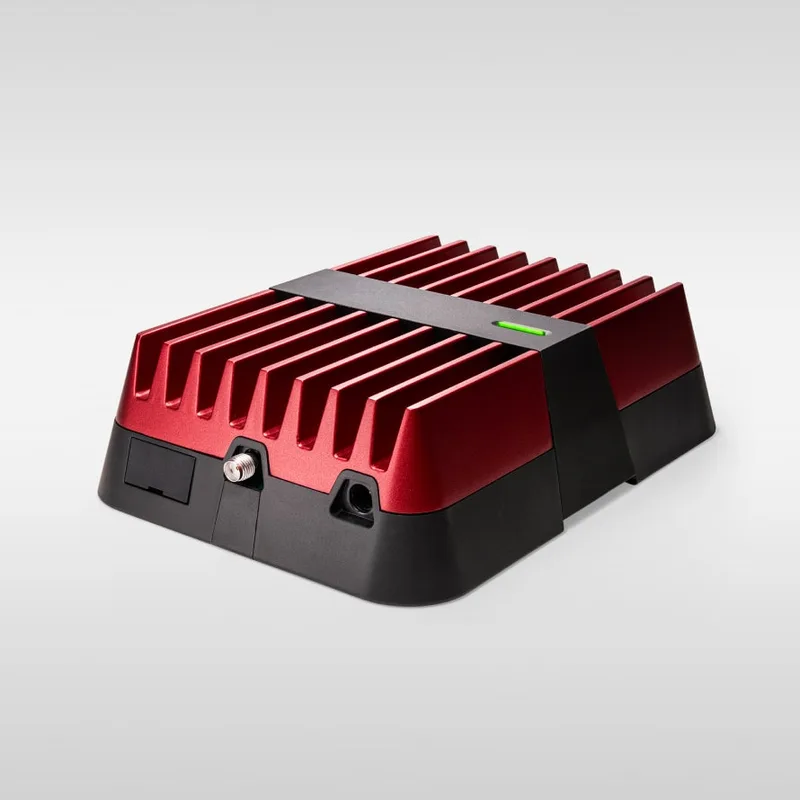
The weBoost Drive Reach RV. It felt expensive and is now indispensable. It boosts the signal you already have across carriers, which turns "borderline" into "usable" when you need it.
Get the weBoostJust email and browsingTap for our answer
Your phone is enough. Its hotspot handles light use, and it's what we use day to day. Don't overbuy.
Read the full guide
Last reviewed: August 2026
We’ve been running internet from a van for eight years. For most of that it was navigation, staying reachable, and finding the next place to sleep, not video calls. As we did more on our computers from the van, the gap between a connection that holds and one that doesn’t stopped being an annoyance and started to matter.
I’ve had dead zones in the Colorado mountains, 5G in downtown San Diego, and everything in between. I know what holds up across all of it, and which purchase felt expensive at first and became indispensable.
Quick Answer
| Product | Best For | Price | Pros | Cons | CTA |
|---|---|---|---|---|---|
| Van Hotspot Router Setup | Full-time remote work | $$ | Reliable uplink, flexible install, multi-carrier | More setup than tethering | Check Router Picks |
| Signal Booster Kit | Fringe coverage and rural travel | $$$ | Real difference in weak-signal zones | Does not create signal where there is none | See Booster Deals |
| Phone Tether Backup Setup | Tight budgets or backup | $ | Zero extra hardware required | Inconsistent under sustained work sessions |
Van Hotspot Router Setup
Best For: Full-time remote work
Price: $$
Pros: Reliable uplink, flexible install, multi-carrier
Cons: More setup than tethering
Signal Booster Kit
Best For: Fringe coverage and rural travel
Price: $$$
Pros: Real difference in weak-signal zones
Cons: Does not create signal where there is none
Phone Tether Backup Setup
Best For: Tight budgets or backup
Price: $
Pros: Zero extra hardware required
Cons: Inconsistent under sustained work sessions
Is this internet plan right for you?#
Tap the situation that sounds like you.
💼 Full-time remote work: video calls, file uploads, multi-hour sessions. Full setup
This is exactly what the page is for. Hotspot router + booster + backup SIM is the infrastructure for full-time remote work. The booster is the marginal upgrade that turns "borderline" into "usable" on real workdays.
Plan around coverage when work demands reliable uptime: equipment helps in marginal areas, but it can't create signal where there's no tower.
📱 Light usage: email, browsing, occasional calls. Phone tethering works
Phone tethering is fine here. Don't overbuy. A backup SIM on a different carrier is still cheap insurance for travel days, but the booster and dedicated router are overkill for occasional use.
🏞️ I camp deep in BLM land or remote forests for weeks. Starlink territory
Cellular-first won't cut it. Starlink RV is the only reliable option for areas without towers. Plan for the power draw (30–50W under load) and the equipment cost. For most highway-and-town van life, this is overkill.
🤝 Couples both working from the van. Two carriers, real router
Two simultaneous video calls on a hotspot will stress your connection. A real hotspot router with external antenna support handles couple loads better than phone tethering. Two carriers means one bad cell isn't a workday-killer.
What 8 years of van internet taught me#
The weBoost: the purchase we both resisted, and both wish we'd made sooner +
We put off buying the weBoost Drive Reach RV for a year or two because the price felt hard to justify. We both thought the same thing: too expensive for what it is.
After we finally bought one, we both said the same thing about that too: we should have done this a long time ago.
What a cellular booster does is amplify weak signal that's already there. It doesn't create signal. In a parking lot a mile from a cell tower, it won't turn nothing into something. But in the situations where you have one or two bars and a dropped call, which happens regularly on the road, it turns that marginal connection into something stable.
The difference between "usable" and "borderline" internet can determine whether your work day functions or doesn't. For full-time remote workers, this isn't a nice-to-have. It's part of the infrastructure.
Coverage is a location problem, not a device problem +
The most common internet mistake in van life is trying to solve a location problem with hardware. If you're 40 miles from the nearest tower, the best router and booster in the world won't give you a reliable video call. Planning where you park matters as much as what equipment you have.
Canyon terrain can beat any booster. If a day needs a reliable connection, plan where you park for it: in town, or with a line of sight to the highway.
Our coverage breakdown by region +
San Diego (winters): Excellent cellular everywhere. Multiple carriers, strong signal, 5G in most of the metro. We barely think about internet here.
Colorado (summers): Highly variable. Denver and Boulder are fine. Go 30 miles toward the mountains and coverage drops fast.
Florida: Good coverage in coastal areas and cities. Signal degrades in rural inland. The booster makes a real difference in places like state forest campgrounds that are still within range of a tower but not close enough for reliable calls without help.
New York (family visits): Urban coverage is strong. Not an internet problem.
A second carrier: cheap insurance, though we run one +
We've always run one phone plan, and with the booster it has been enough for how we use the internet. If your work depends on staying online, a second carrier is the cheapest redundancy there is.
When one carrier has a tower outage, congestion, or a dead zone in a specific area, another carrier often has coverage. Not always; sometimes both are equally weak. A low-cost prepaid SIM on a different network is enough for the backup.
Check coverage maps before each trip leg. Pick your primary and backup based on towers in the areas you're heading.
Hotspot router vs phone tethering +
Phone tethering works. It's the right answer for low-data users and occasional van lifers. For sustained remote work (video calls, file uploads, multi-hour sessions) it isn't reliable enough as a primary setup.
The battery drain on your phone, the heat it generates, and data throttling on most plans make phone tethering a good backup and a poor primary for heavy work. A dedicated hotspot draws from a separate data plan and stays live without depending on your phone's battery. For a while we had a T-Mobile hotspot device, about $30 a month for unlimited data. Today we use the phone's hotspot.
The upgrade worth making: a router that supports external antenna connection. The hotspot works fine in strong signal. The external antenna is what makes it usable when signal is marginal.
What about Starlink? +
Starlink is impressive, and the RV plan is set up for mobile use. For van lifers who spend time in truly remote areas (national forest dispersed camping, BLM land far from towns), it's the only real option for consistent internet.
For most van life routes that follow highways and stop in or near towns, cellular-first is cheaper, simpler, and requires less power. Starlink is a real power draw, needs a clear view of the sky, and adds monthly cost and hardware complexity. We haven't needed it for eight years. If your lifestyle involves frequent remote camping, evaluate it seriously.
Top picks explained#
The base of a reliable remote work setup. Choose a router designed for mobile use with at least one external antenna port. The antenna you add later is what handles fringe coverage without needing a separate booster.
Our booster, and the one we recommend for full-time van lifers. weBoost now sells it as the Drive Reach RV II. Amplifies existing signal across multiple carriers simultaneously. Antenna goes outside, booster unit inside; ours folds flat against the roof rack to drive. Setup is straightforward. The difference in marginal-signal situations is meaningful.
weBoost Drive Reach RV
Check weBoost Drive Reach RV PriceHow we get online day to day: the phone's hotspot, with the weBoost doing the work when signal is weak. If your work depends on uptime, add a second SIM on a different carrier; the cost is low and the redundancy is real.
Frequently asked#
Is Starlink required for van life? +
No. Most van lifers who follow standard routes (highways, towns, established campgrounds) operate fine with cellular-first setups. Starlink is worth evaluating if you spend significant time far from any cell tower.
What matters more, router or signal booster? +
They solve different problems. The router is your daily connection tool. The booster handles situations where signal is marginal. If budget forces a choice, start with a quality router and add the booster after you've experienced the situations it solves.
Do I need both carriers on full unlimited plans? +
No. Your primary carrier handles most usage. The backup can be a low-cost secondary SIM on a prepaid plan; you're using it for days when your primary has coverage issues, not as a daily driver.
How much power does a hotspot router draw? +
12V-native routers typically draw 5–15W. Starlink draws 30–50W under load. For a cellular hotspot, power isn't the constraint; it's a minor load compared to a fridge or laptop.
Build the connection