
You go to bed with the station reading 40%. At three in the morning the fridge stops, the fan stops, and the van is silent in a way that wakes you up faster than noise does. The screen says zero.
That happened to us on the Goal Zero Yeti 1400 and again on the BLUETTI Elite 200 V2. Two units, two brands, two different battery chemistries, same behavior. And it never once happened above 50%. Below 40 or 50 the number would just let go.
The Arithmetic That Proves It’s Lying#
This is the part that took me too long to work out, and it’s the reason I trust the diagnosis now instead of just being annoyed at the gear.
A mild night for us costs 7 to 12%. That’s the fridge cycling, one fan, phones on the charger. On the Elite 200 V2 at 2,073.6Wh, 12% is about 250Wh. On the Yeti 1400 at 1,425Wh, 12% is about 170Wh.
You need your bad-night number too, and it is the one that matters. Hot humid Florida, fridge working hard, both fans running: 15 to 25%. Reported That is the most a night has honestly taken from us, and it is the ceiling the whole test hangs on. Ours line up with everything else on our real-world power page.
So run it. Go to bed at 40%. Subtract our worst night, 25%. You should wake up at 15%.
Waking up at zero means the station gave up 40% on a night where the hardest one we have ever had costs 25%. Batteries don’t do that. Nothing in the van changed, no new load appeared at 2am, the fridge didn’t triple its draw in the dark. The only thing that can produce that result is a number that was wrong before you fell asleep. It wasn’t at 40%. It was somewhere around 15%, and the display was the last to find out.
Once you have your own version of both numbers, you have a lie detector. Any overnight drop well past what that kind of night costs you is a calibration problem, not a power problem. ⚠️ Compare like with like: a hot night with the fans working costs multiples of a mild one, so judging a July night against a April number will have you calibrating a station that is simply doing its job.
Is your percentage lying to you?
Put in what the screen said when you went to bed and what it said when you woke up. If you don't know your own overnight cost yet, leave it at 10%, which is the middle of our range.
This checks one thing: whether the drop you saw is physically plausible for your own setup. It can't tell calibration drift apart from a pack that has genuinely lost capacity. Run the cycle below, and if the readout misbehaves again within a few cycles, the capacity is really gone.
What The Screen Says vs What’s True#
Tap each one.
What the screen says 40%, plenty for the night Tap to see what's going on ↓
What the screen says Steady all morning at 100% Tap to see what's going on ↓
What the screen says Dropped 15% in an hour Tap to see what's going on ↓
Why It Drifts In The First Place#
Your station doesn’t have a fuel gauge. There’s no float in a tank. The battery management system is counting energy in and out and doing bookkeeping, a method called coulomb counting, and the arithmetic is only as good as the current sensor doing the counting.
Cheap sensors have a zero-point error. The battery sits at rest and the sensor reports a trickle that isn’t there. Each error is tiny. None of them ever get corrected on their own, so they stack, day after day, and the running total slides away from the truth.
Voltage would normally rescue the estimate, and on some chemistries it does. On LiFePO4 it mostly can’t. The voltage curve is famously flat through the middle: a 12V pack sits between roughly 13.0V and 13.3V from about 20% all the way to 90%. That 0.3V window covers about 70% of the usable capacity, which makes voltage nearly useless as a mid-range cross-check. The Elite 200 V2 is LiFePO4. The Yeti 1400 was NMC, which has a friendlier curve but still leans on the same counting, which is why we saw the problem on both.
There are exactly two places the BMS gets to stop estimating and actually know something:
And this is also why our failures only ever happened below 50%. We charged to full constantly, so the top anchor got reset all the time and the top of the range stayed honest. The bottom anchor almost never got set, because who deliberately runs their power station to zero? So the BMS knew exactly where full was and had only a stale guess about where empty was. The error had nowhere to show up except down low, which is precisely where we kept finding it.
The Fix Is A Full Round Trip#
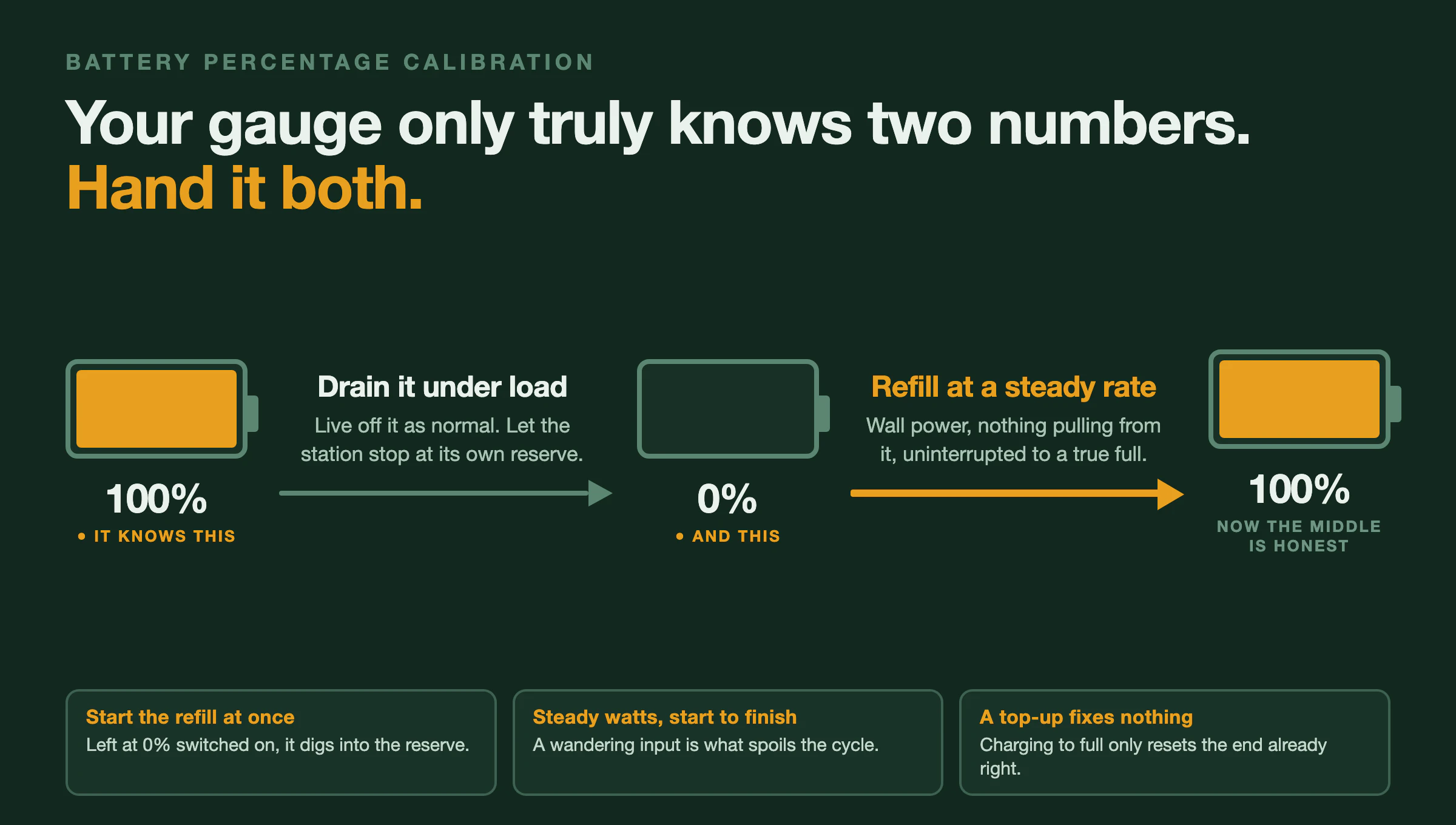
Charge to 100%. Run it down to 0%. Charge back to 100%. You’re handing the BMS both anchors in one pass, and the middle of the range gets redrawn between two points it measured.
Here’s the part I got wrong for years, and I’d rather say it plainly than pretend I knew: this is BLUETTI’s own procedure. I’d assumed I was going beyond the manufacturer with the full cycle. I wasn’t. Their documented recalibration is drain under load, then recharge to full, which is the same round trip. What’s floating around online is a simplified “just charge it to 100%” version, and that version only resets the anchor that was already fine. If your problem is a station that dies at 40%, a top-up calibration cannot fix it. It never touches the end of the range that’s broken.
Three details in the real procedure that nobody repeats, all of which I only learned while writing this up:
Drain it under load, through the station itself. Run your normal stuff off it. Don’t try to keep it empty-handed. Draining through the head unit is what lets the BMS stop at its own reserve instead of going past it.
Start recharging as soon as it hits zero. Don’t leave it sitting overnight at 0% with the unit switched on. Below the displayed zero there’s a reserve, and a station left on can keep working its way into it. This one was news to me and it’s the reason I’d now plan the cycle so the recharge starts while I’m awake.
Hold the charge rate steady. BLUETTI’s wording is that if you start charging at 500W, you should stay at 500W until it reads full. A wandering input is the thing that spoils the recharge leg. That also reframes the advice I’d been giving for years, which was to unplug everything: pulling loads off the station isn’t really a rule of its own, it’s the easiest way to keep the net input from jumping around while it fills.
I learned this part the hard way rather than from a manual. I have had calibration cycles fail on solar, on both the Yeti and the BLUETTI. Ran the whole thing, drained it right down, put it back up on panels, and the percentage was still wrong afterward. It took me longer than it should have to connect that to the weather. Panels don’t deliver a constant rate. A passing cloud drops the input and brings it back, over and over, all afternoon, and that is exactly the wandering input BLUETTI is telling you to avoid. That’s why I only ever calibrate on wall power now. It’s also why the hotel room works so well, which I didn’t understand at the time.
If you take one thing from this post beyond the cycle itself, take that. A calibration run on solar can fail through no fault of the procedure, and you’ll blame the station.
What we do. Run it down through normal use. Start the refill on shore power the moment it reads zero, with the fridge moved off the station so the input holds steady, and let it go to a true 100% without interrupting it. That's it. It's a few hours of attention, not a lost day.
The Hotel Room#
We’ve rented a hotel room to do this. More than once, and for both stations.
It sounds ridiculous until you’ve tried to run a calibration cycle out of a van. You need somewhere to plug in that isn’t weather, you need the charge to run uninterrupted at a constant rate, and you need the fridge to be somewhere other than on the station you’re trying to empty. A cheap room solves all three at once, and it costs less than the food in the fridge.
I don’t think it’s the only way. If you have a campground with hookups and somewhere cold to stash your food, that works fine. But I’ve stopped being embarrassed about the hotel version. The cycle is worth doing properly, and doing it properly needs a wall outlet you can sit next to.
Is It Calibration, Or Is The Battery Actually Dying?#
From the screen these look identical, and it’s worth knowing which one you’ve got before you spend a night solving the wrong problem.
Calibration drift is a bookkeeping error. The capacity is still in there, the BMS has just lost track of where the edges are. A full cycle fixes it and the numbers behave afterward.
Real capacity loss is the cells aging. A pack that’s down to 70% of its original capacity will show you a fast, believable drop every time, and a calibration cycle won’t change anything, because the number isn’t wrong. The battery really is that small now.
The test is simple: run the cycle. If the readout behaves afterward, it was calibration. If it comes right back within a few cycles, the pack has lost capacity and no amount of recalibrating gets it back.
Ours corrected on both units, which is how I know what we had. And it held. The Elite 200 V2 has read honestly since we ran the cycle on it, including down in the range where it used to let go. That’s the part that tells you it was bookkeeping and not the cells: a battery that’s worn out doesn’t start telling the truth again because you drained it once.
When To Run One#
On any new station, before you trust it. It may have sat in a warehouse at partial charge for months, and factory calibration isn’t a promise about the unit that shows up at your door.
After long storage. A month or more parked at partial charge is enough for the estimate to go stale.
When the number starts behaving strangely. Sudden cliffs, readings that don’t match how long things actually ran, or a percentage that sits unchanged for suspiciously long.
Worth being clear about the cost, since full cycles get talked about like they’re free. They aren’t ideal for the cells. Lithium packs are happiest cycling shallowly, and running to a hard zero is more wear than a normal day. But one deliberate cycle against a rating in the thousands is a rounding error, and a station whose readout you can’t trust is a station you can’t plan around. I’ll take the trade once or twice a year.
You’re Not The Only One This Happened To#
For a long time I assumed we’d been unlucky twice. We weren’t. BLUETTI’s own community forums carry the same report across a spread of models: AC180 owners watching the state of charge drop to zero from 60 to 70%, EnergyPro units falling off below 20%, an AC200max going from 90% to zero overnight. Ours going at 40 to 50% sits right in the middle of that range.
It isn’t a defect in one bad unit and it isn’t one brand’s problem. It’s what coulomb counting does when it never gets corrected, and it will happen to any station whose bottom anchor goes unset for long enough.
Where The Numbers Come From#
- 7–12% on a mild night, 15–25% on a hot Florida one, and the 40% failures: our own use across the Yeti 1400 and the Elite 200 V2. Reported
- Calibration cycles failing on solar, on both units: our own repeated experience, and the reason we now calibrate on wall power only. Reported
- Capacities used in the math: 1,425Wh Yeti 1400, 2,073.6Wh Elite 200 V2. Spec
- The recalibration procedure (drain under load, recharge immediately at 0%, constant wattage): BLUETTI’s published battery maintenance guidance.
- The LiFePO4 voltage window (about 13.0–13.3V from 20–90% on a 12V pack) and coulomb-counting sensor drift: lithium battery management references, cross-checked across several sources.
- Other owners’ reports: BLUETTI community forum threads across the AC180, EnergyPro and AC200max.
How we label claims lives on our testing and sourcing page.